
Live Translation
Translate system audio into subtitles or interpret your microphone input and send the translated speech through a virtual audio device. Ten recognition languages are supported.
Live Translation has two modes.
ASR model required
Before using Live Translation, install an ASR model. Without an ASR model, EasyChat cannot recognize speech.
Audio Translation
EasyChat recognizes audio and video playing on your system, then displays the translated result as subtitles.
Live Interpretation
Speak into your microphone and EasyChat recognizes, translates, and sends the result to a virtual audio device for use in other applications.
Install an ASR model
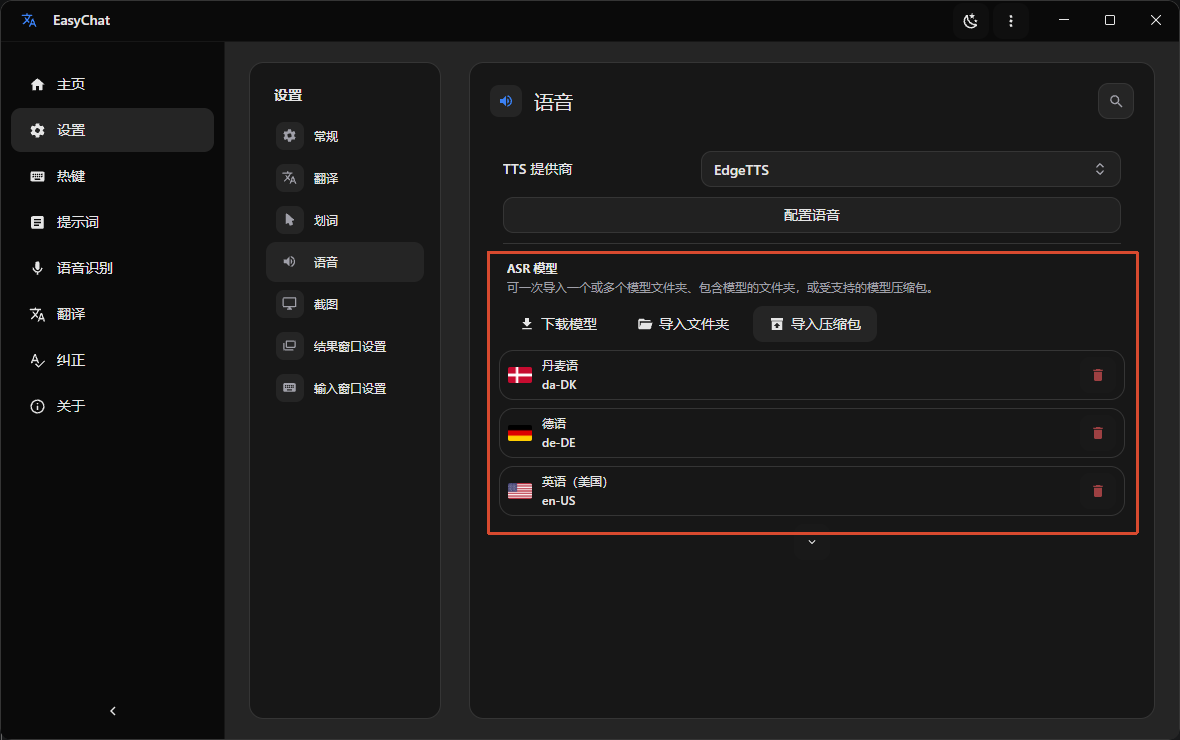
In Settings -> Speech -> ASR Model, download or import the ASR model you need.
Download notes
Users in mainland China may experience download failures because of network issues. Configure a proxy in Settings -> General -> Network Proxy, or use a tool such as Watt Toolkit to accelerate GitHub downloads. You can also manually import a model downloaded from GitHub, Google Drive, or the files in our QQ Group.
Supported languages
Ten recognition languages are supported. Each requires its own ASR model, so download the matching model before you begin.
| Language | Code |
|---|---|
| English | en-US |
| Chinese (Simplified) | zh-CN |
| Japanese | ja-JP |
| Korean | ko-KR |
| German | de-DE |
| Danish | da-DK |
| Spanish | es-ES |
| French | fr-FR |
| Italian | it-IT |
| Portuguese | pt-PT |